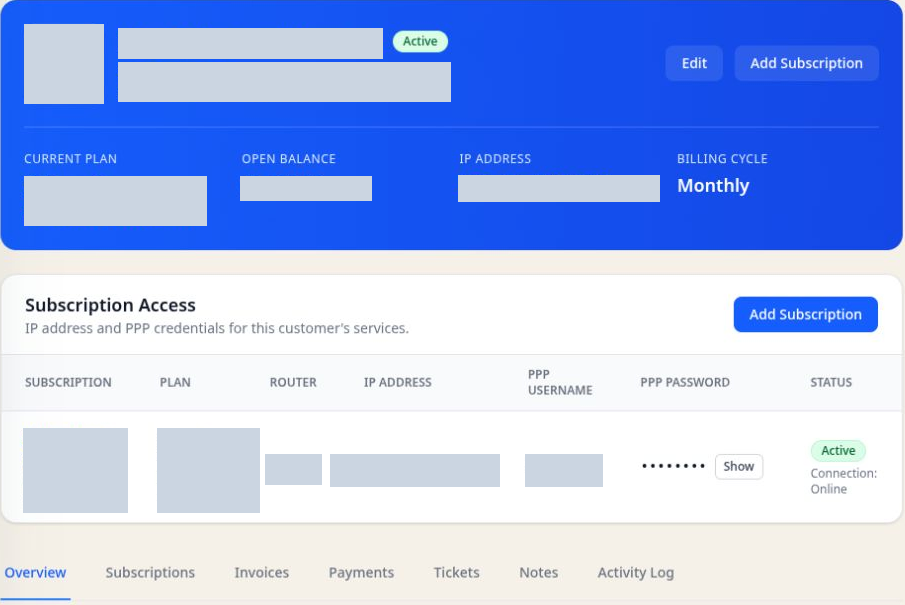
Complete subscriber profiles
See contact details, service locations, plans, subscription state, balances, usage, and history together.
WISP CRM
A wireless installation starts with a service location and continues through activation, billing, and support. SkyBase connects subscriber records to appointments, work orders, MikroTik services, and account history so your WISP team can follow the job from the first visit to ongoing service.
Free for up to 40 subscribers.
The everyday work
Keep the useful details close.
See contact details, service locations, plans, subscription state, balances, usage, and history together.
Coordinate appointments, assigned technicians, work orders, and materials for subscriber installations. Keep notes with the customer for the next visit.
Review invoices, payment status, credit, and service information while speaking with the customer.
Give subscribers a portal for service details, invoices, notifications, profile updates, and support requests.
Inside SkyBase
Why it is different
A WISP customer relationship includes a physical location, an active service, network credentials, recurring billing, support history, and often on-site work. SkyBase keeps those relationships visible without forcing teams to reconstruct them from separate tools.
A connected workflow
01
Record the subscriber location and selected plan. Arrange the appointment and work order so the technician has the service details before the visit.
02
Connect the subscription to its site, router, credentials, IP assignment, and service state.
03
Handle questions with billing, connection, usage, ticket, and previous activity context in view.
Common questions
A WISP CRM links the customer relationship to subscriptions, network access, billing cycles, usage, service status, support, and field operations. A general CRM typically stops at contacts and sales activity.
Yes. SkyBase includes a customer portal where subscribers can review service information, invoices, notifications, usage, and support requests.
Yes. SkyBase includes tenant-level roles, permissions, and user groups so staff access can match their responsibilities.
Explore SkyBase
See how the customer, business, and network parts of the platform work together.
WISP management software
WISP management software for subscribers, billing, and support
MikroTik ISP software
MikroTik ISP software for RADIUS, PPPoE, and billing
ISP CRM software
ISP CRM for customer accounts, subscriptions, and billing
ISP billing software
ISP billing software for recurring invoices and payments
Guide · Choosing an ISP CRM
Bring a normal working day to the demo.
Guide · ISP software migration
Changing software is a project. Give it a plan.
Guide · MikroTik billing
An unpaid invoice and a broken connection need different answers.
All features
Explore the complete SkyBase feature set.